Lenovo

Executive Approval Package

Permit-to-Work (PTW) System

Lenovo Smart Campus Security Department (SASC)

Prepared ByLenovo Smart Campus Security Department (SASC)
AudienceAll working and related parties
Version1.0
DateJune 29, 2026
PurposeApproval for PTW System implementation

01. Executive Summary

Approval is requested to implement a simplified, traceable PTW system within one operational week.

Summary

By observing the current PTW process and the common practices used by everyone involved, SASC determined that the best approach is to simplify the process and requirements while maintaining high safety standards.

The proposed PTW System provides traceable data that reflects actual onsite activity, improves permit visibility, and prepares the campus for transition to a fully digitalized PTW system.

To support a smooth transition, the current PTW document will temporarily be treated as the PTW Request Form. Parties can continue using the familiar current permit format to capture work details and approvals while Security assigns and issues the new controlled PTW.

Approval ItemDecision Requested
PTW SystemApprove implementation.
WorkflowApprove the frozen PTW workflow.
FormsApprove request, issued PTW, checklist backs, register, and archive index.
AdministrationApprove Security as Permit Controller.
ScheduleApprove one-operational-week rollout.

02. Current Issue and Proposed Solution

The system keeps the familiar field experience while improving control, traceability, and close-out discipline.

Current IssueOperational ImpactProposed Solution
Permit information is not consistently centralized.Active work status is difficult to confirm quickly.Security-controlled PTW numbering, issue, register, and archive.
Work descriptions, approvals, and safety checks sit together in one busy form.Records are useful, but control points are not clearly separated.Request form captures work details; issued PTW controls permit validity and close-out.
Checklist requirements vary by activity.Permit-specific hazards can be hard to audit consistently.Four PTW back-face checklists: Hot Work, Height, Electrical, Other High-Risk.
Future digitalization would require cleanup later.Data may not map cleanly into a digital system.Structured fields create traceable data ready for future electronic PTW.

03. Frozen Workflow

The approved workflow is retained; the change is document control and traceability.

1Contractor Request

Work details and required attachments.

2Area Owner Approval

Area readiness and operational acceptance.

3HSE Approval

Safety requirements and checklist validation.

4Security Verification

Route completion verified.

5PTW Number

Security assigns controlled number.

6PTW Issuance

Official permit issued and displayed.

7Work Execution

Toolbox talk, work starts, monitoring.

8Close-Out

Permit returned and closed by Security.

9Archive

Record indexed and retained.

04. Roles and Responsibilities

Security controls the permit system; technical approval remains with Area Owner and HSE.

ActivityContractorArea OwnerHSESecurity
Prepare PTW requestRCCI
Approve work area readinessCACI
Approve safety requirementsCCAI
Verify workflow completionCIIA/R
Issue, monitor, close, register, archiveCIIA/R
R Responsible A Accountable C Consulted I Informed

05. Implementation Plan

The system is ready for implementation within one operational week.

Day 1

Approval and Release

Release controlled PTW package and implementation notice.

Day 2

Security Training

Train verification, numbering, issuance, monitoring, close-out, archive.

Day 3

Area Owner / HSE

Align approvals, checklist expectations, and role boundaries.

Day 4

Contractor Briefing

Brief request preparation, permit display, and return requirements.

Day 5

Go-Live

Start use, maintain register, and complete first control review.

06. Transition Approach

Use the familiar current PTW as the request record until all parties complete the transition.

Step 1: Bridge Period

The current PTW document is accepted as the PTW Request Form. It captures work details, attachments, and existing approval signatures.

Step 2: Security Control

Security verifies the request record, assigns the PTW number, issues the new controlled PTW, and records it in the Daily Permit Register.

Step 3: Full Transition

After briefings are complete, all parties move to the new PTW Request Form and issued PTW as the standard process.

Why this reduces risk

The transition avoids disruption, uses a form people already recognize, and still starts the new numbering, register, close-out, and archive controls immediately.

07. Document Set

The operational pack is complete, but management approval only needs a concise overview.

DocumentPurposeControl Point
PTW Request FormCaptures work description, attachments, planned dates, safety requirements, and approvals.Before Security issues PTW.
Issued PTWOfficial controlled permit issued by Security against an approved request.Permit display, validity, monitoring, return, close-out.
Checklist Back PagesPermit-specific controls for Hot Work, Height, Electrical, and Other High-Risk work.Printed on reverse/back of applicable PTW copy.
Daily Permit RegisterDaily view of active, returned, and closed permits.Security administration.
Permit Archive IndexTraceable record of closed permits and supporting documents.Security archive control.

08. Form Sample

PTW Request Form: familiar permit presentation, clearer request-stage purpose.

Permit-to-Work Request Form LENOVO Project Document No.: SASC-PTW-FRM-001
Section 1: Task Description
Issued ToResponsible SupervisorPhone No.
LocationEquipment No.Shift
Start DateEnd DateAttached Documents
Date and Work Description
Section 2: Request Safety Requirements
RequirementYesNoN/ARemarks
Risk assessment attached
Linked permits / attachments identified
Required PPE / specific controls identified
Section 3: Request Approval
Contractor
Date / Time / Name / Signature
Area Owner
Date / Time / Name / Signature
HSE
Date / Time / Name / Signature
Security Verification
Date / Time / Name / Signature

09. Form Sample

Issued PTW: Security-controlled permit issued against the approved request.

Permit-to-Work LENOVO Project Document No.: SASC-PTW-FRM-002
Permit CodePermit NumberApproved Request Ref.
Section 1: Issue and Validity
Issued ToLocationPermit Category
Valid FromValid ToChecklist Back
Permit Display LocationToolbox Talk CompletedSecurity Issuer
Section 2: Acceptance, Monitoring, and Close-Out
ControlDate / TimeNameJob TitleSignature
Issue and Acceptance
Security Monitoring
Extension / Cancellation
Permit Return and Close-Out

10. Checklist Back Pages

Each permit category has a specific reverse-side checklist, printed on the back of the applicable PTW.

Hot Work

Risk assessment, fire watch, flammable clearance, extinguisher/hose, fire blanket, welding/cutting inspection, gas test log.

Working at Height

Platform/scaffold inspection, fall protection, harness/lanyard, anchor point, ladder safety, drop zone, secured tools.

Electrical

Isolation, lockout/tagout, zero-energy verification, circuit identification, electrical PPE, barricades, competent person.

Other High-Risk

Method statement, barricades, special equipment, emergency arrangement, PPE, linked permits, special HSE conditions.

Security Manager
Name / Signature / Date
HSE Manager
Name / Signature / Date
Operations Manager
Name / Signature / Date
Site Director
Name / Signature / Date

Appendix A

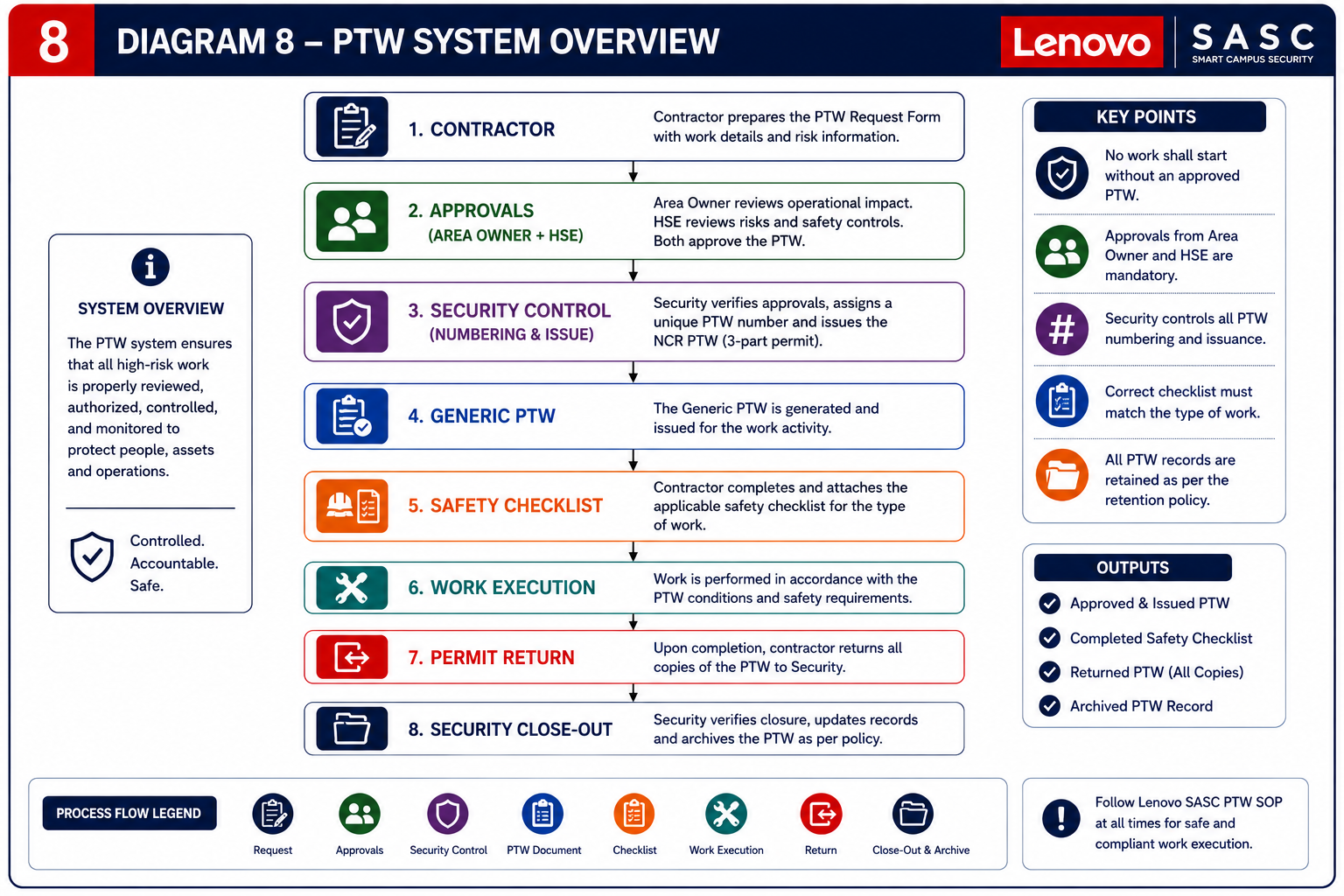
PTW System Overview Diagram

PTW system overview infographic

Appendix B

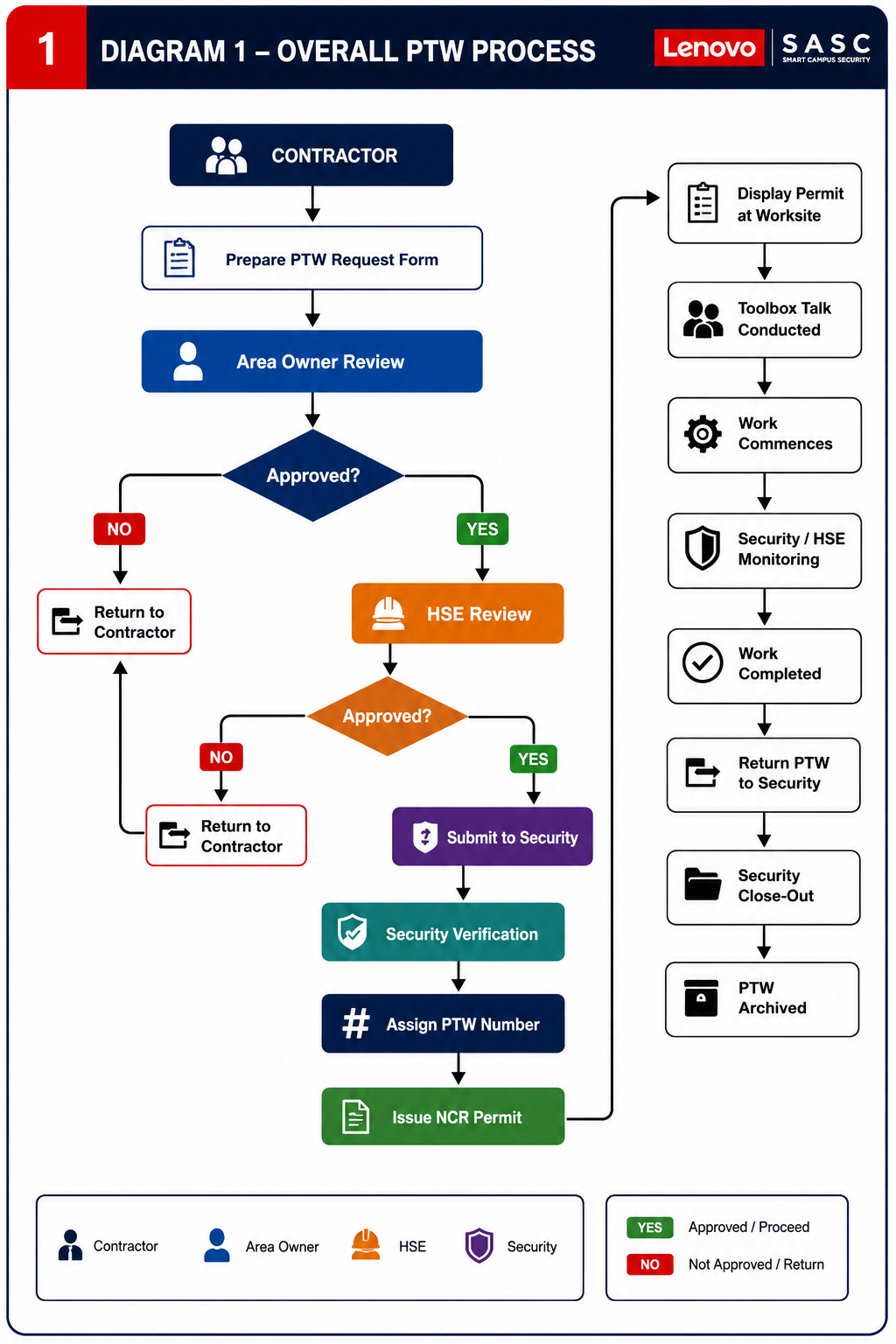
Overall PTW Process Diagram

Overall PTW process flowchart

Appendix C

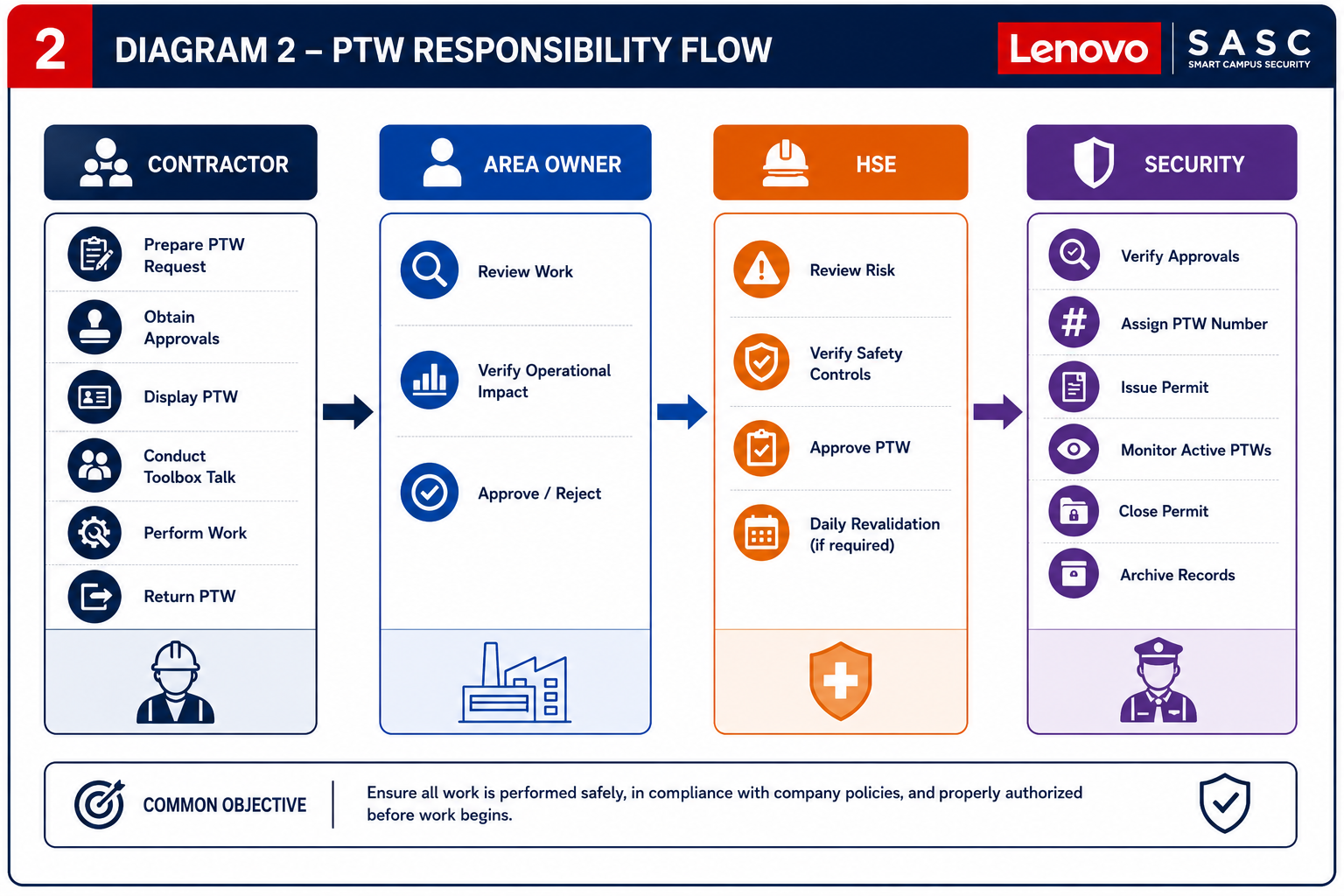
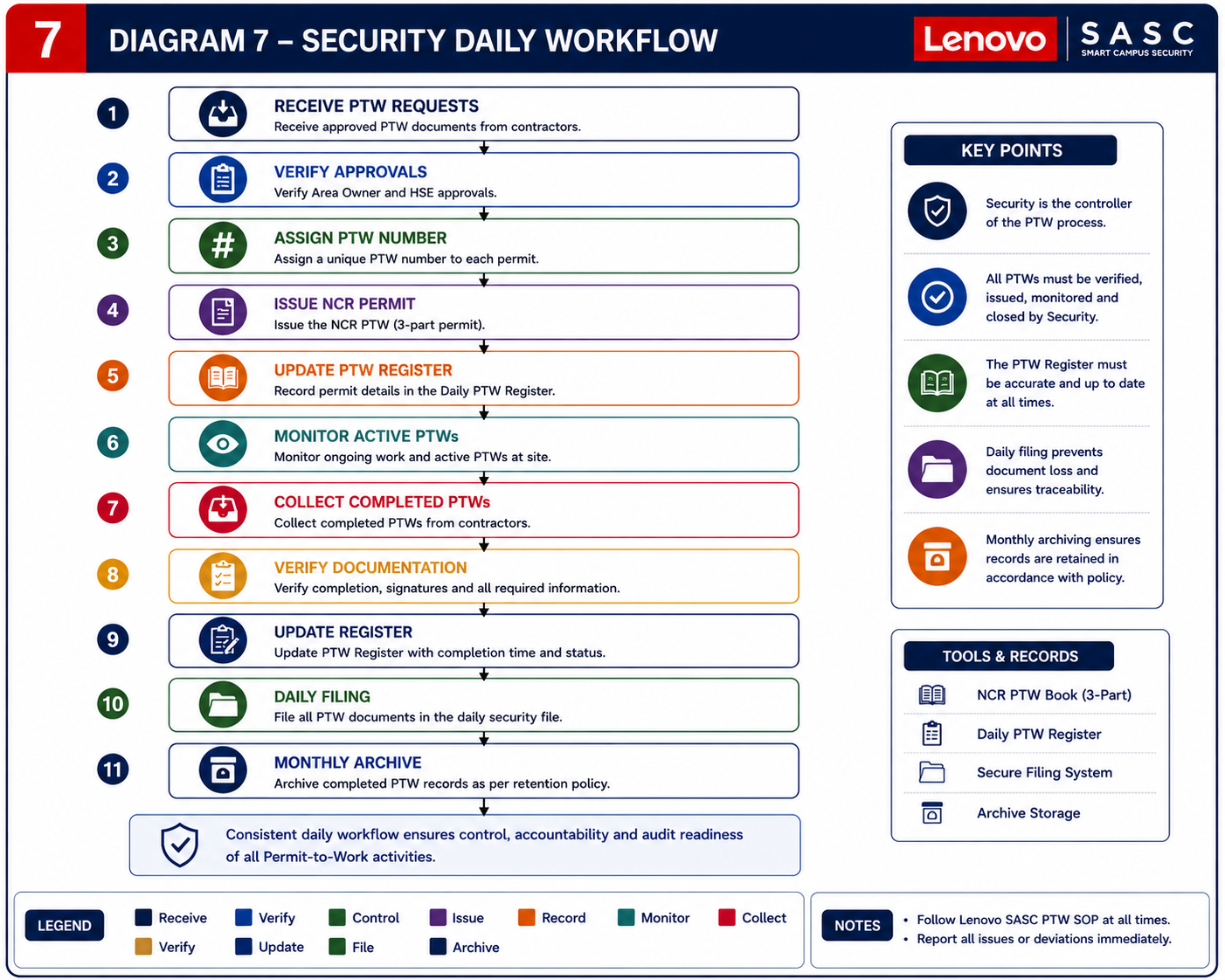
Responsibility Flow and Security Daily Workflow

PTW responsibility flow diagram
Security daily workflow diagram

Appendix D

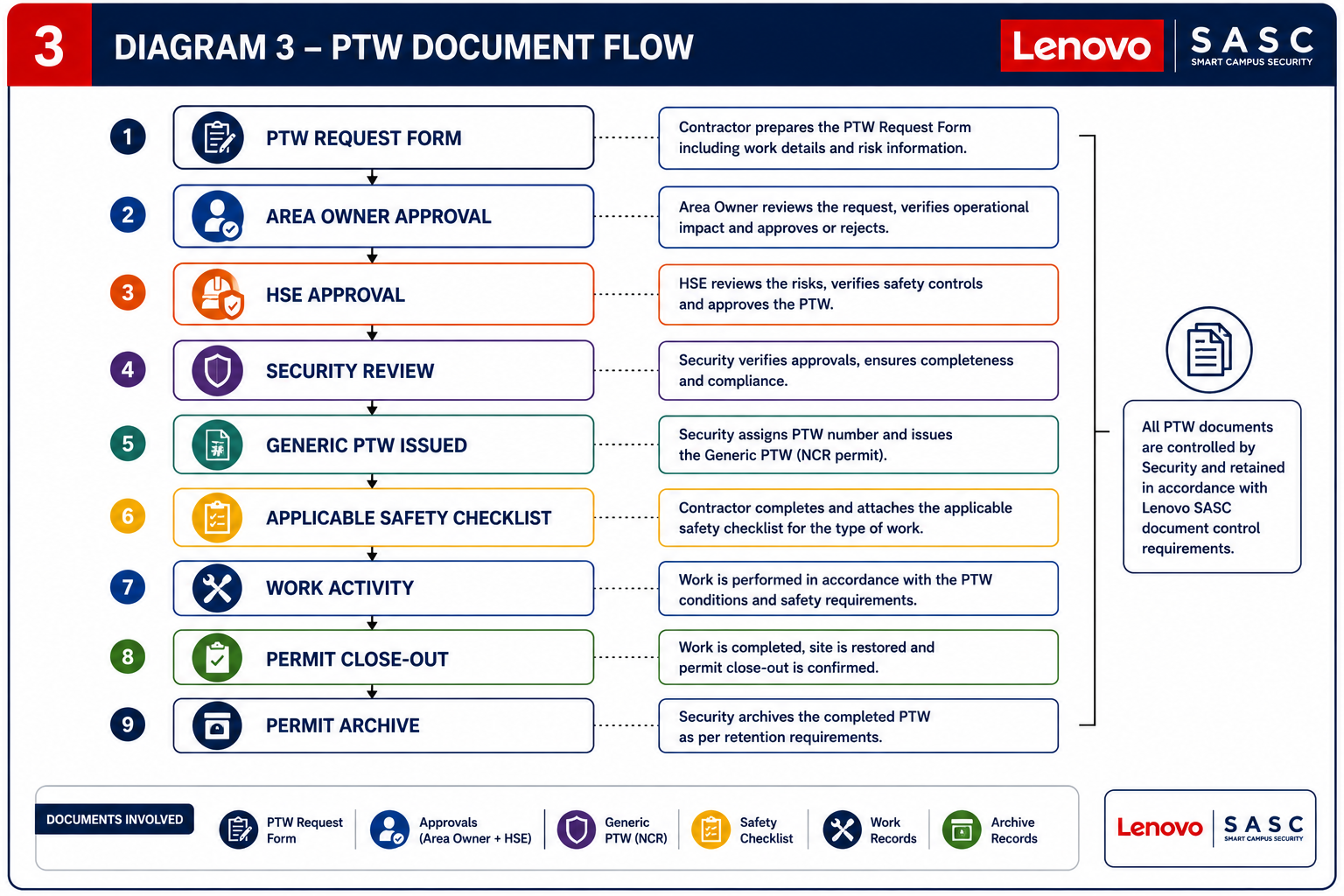
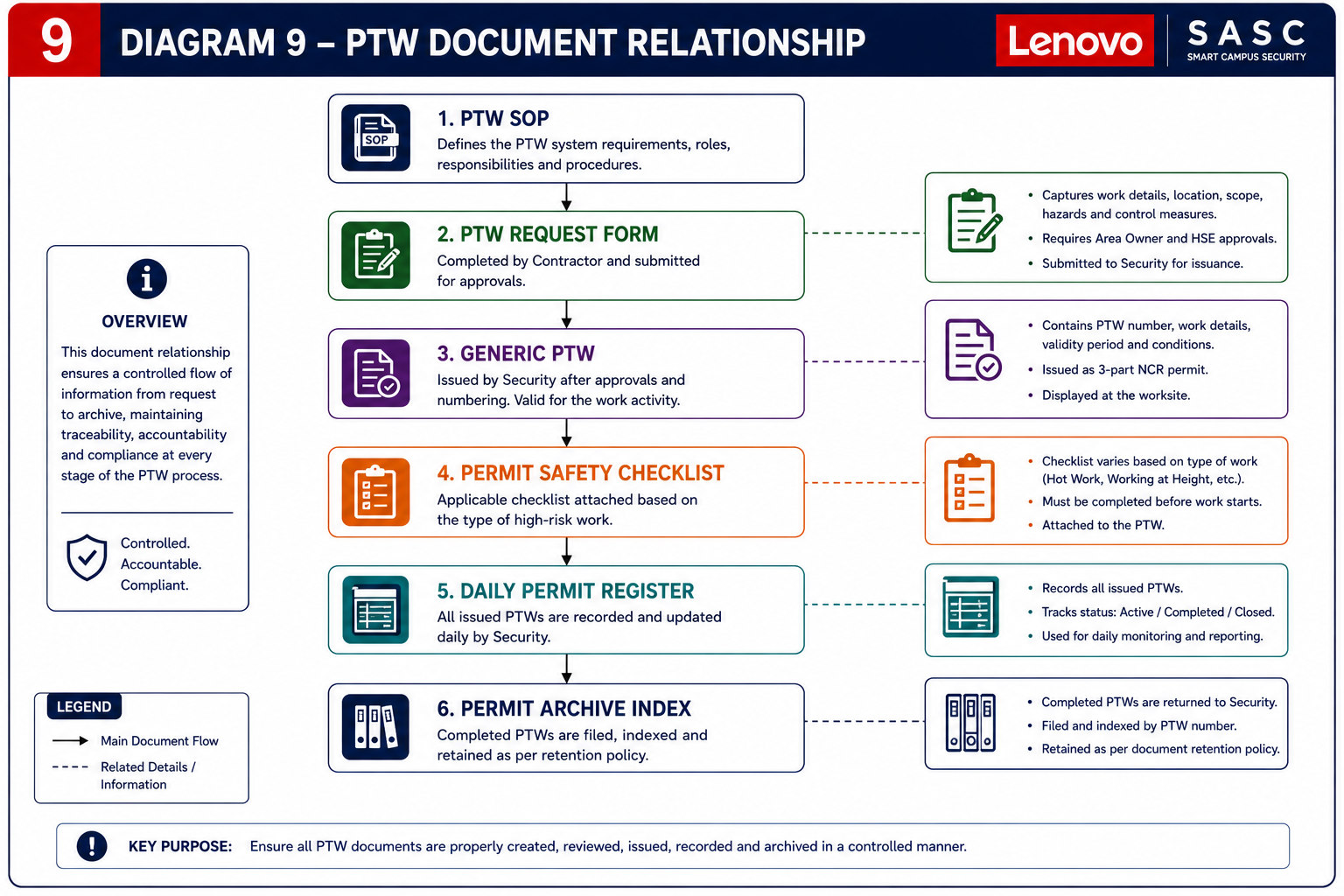
PTW Document Flow and Document Relationship

PTW document flowchart diagram
PTW document relationship flowchart

Appendix E

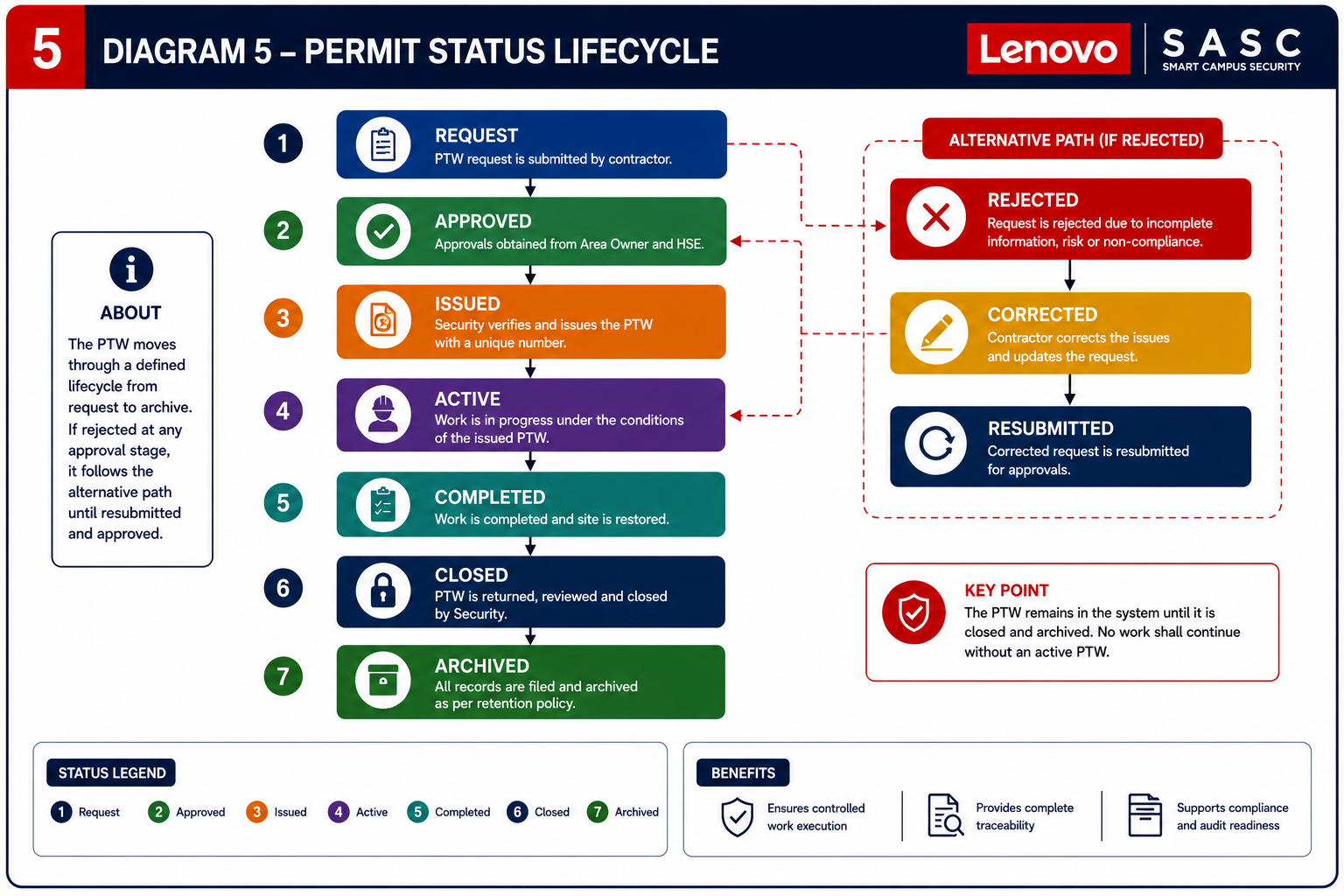
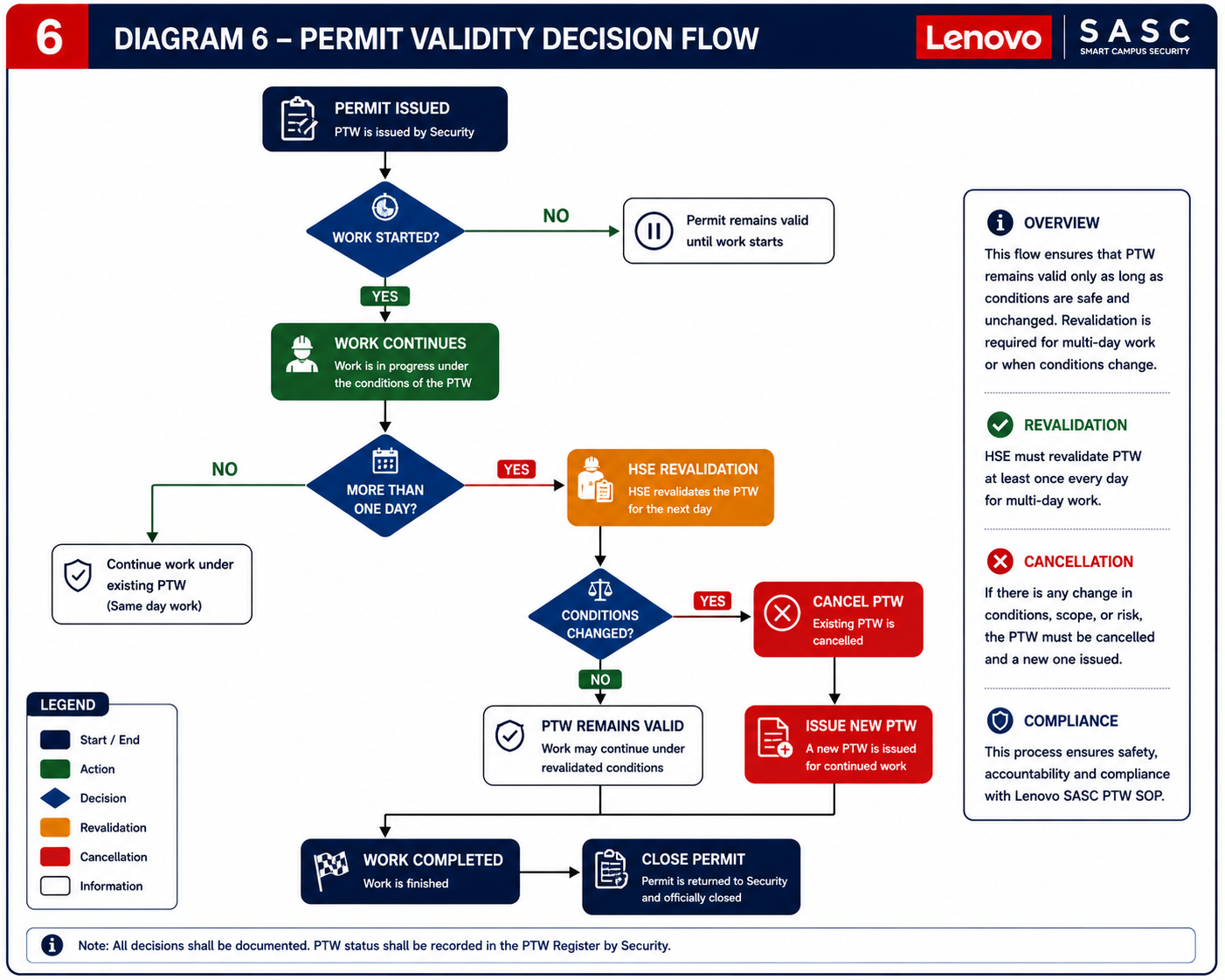
Permit Status Lifecycle and Validity Decision Flow

Permit status lifecycle flowchart diagram
Permit validity decision flowchart

Appendix F

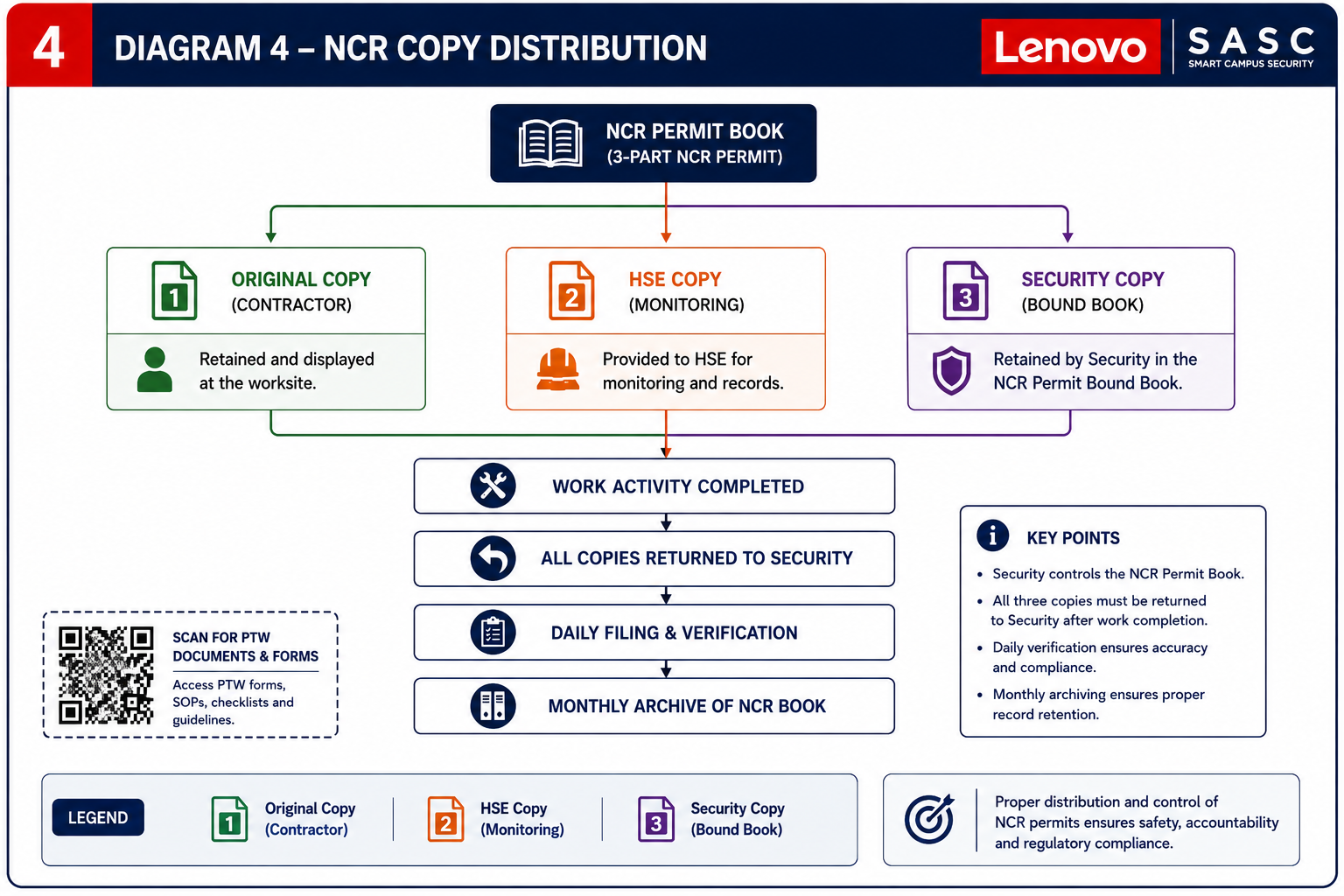
NCR Permit Book Copy Distribution

NCR permit book distribution flowchart

Appendix G

Ops-Hub PTW Tour — At a Glance

Portal: https://ops-hub.live · Digital mirror of the paper PTW flow. Four touch-points, no paragraphs — captions only.

1 Public request portal · /request
ops-hub.live/request PERMIT-TO-WORK General Work scope Location Duration Hazards · controls · contact SUBMIT
No login · structured form · returns tracking reference.
2 Internal dashboard · /ptw
PTW Dashboard Security · Approver PERMIT # REQUESTOR STATUS EMAIL ACTION SASC-PTW-014ACME Co. Pending SentOpen › SASC-PTW-013BuildCorp Approved SentView SASC-PTW-012MEP Ltd. Rejected FailedResend DETAIL DIALOG Scope · Location · Hazards · Requestor contact Approve Reject Resend
Triage · open dialog · approve / reject · resend email.
3 Approval email
From ops-hub@sasc.lenovo To security-approver@… New PTW request · SASC-PTW-014 Requestor: ACME Co. Scope: HVAC duct welding · Plant 1, Axis 3 Window: 14 Jul · 08:00–14:00 Hazards: Hot work · Working at height REVIEW REQUEST → Single-use signed token · expires after first action
Single-use signed link · delivery status tracked.
4 Issued permit PDF
PERMIT TO WORK SASC-PTW-014 · APPROVED Requestor · ACME Co. Scope · HVAC duct welding Location · Plant 1, Axis 3 Window · 14 Jul 08:00–14:00 Hazards · Hot work · Heights Controls · Fire watch · Harness APPROVER B. Mossua QR · AUDIT Auto-numbered · matches NCR permit-book layout (Appendix F)
Auto-numbered SASC-PTW-… · print-ready · audit-logged.
In-app entry: “Guide & workflow” pill (dashboard) · “Recommended reading” card (/request).

Appendix H

Lifecycle Flow — Requestor · System · Approver

Six steps. Three lanes. Status pills mirror the paper lifecycle in Appendix E.

REQUESTOR SYSTEM APPROVER Contractor /vendor Ops-Hub Security /Bin Mossua 1 Submit /request → PTW tab structured form 2 Auto-number SASC-PTW-014 Pending 3 Notify signed email link Sent/ Failed 4 Review Approve Reject 5 Issue permit PDF · print-ready Approved 6 Close-out timestamped · audit log Closed Reject · reason → Closed
Alignment with the SOP. Digital states (Pending → Approved / Rejected → Closed) mirror Appendix E one-to-one. No new categories, no new approval roles, no change to validity rules. Ops-Hub executes the SOP; it does not replace it.